, use this format replacing “https:” wording with “0,” to push to ATOM’s Param 67:
0, displayguides.dsplwp.ip-ddns.com/wp-content/uploads/2025/01/SwitchHWlogSvr2025.bin
Blog
-
hw log server link
-
(…)testing firmware of ATOM v1.7 incl. of AUxx series and latest
This file to copy paste HTTPS URL then further edit like below screenshot:
only meant for firmware reverting and upgrading test (by SE engineer), but remove “https:”, and add prefix “0,”
e.g.: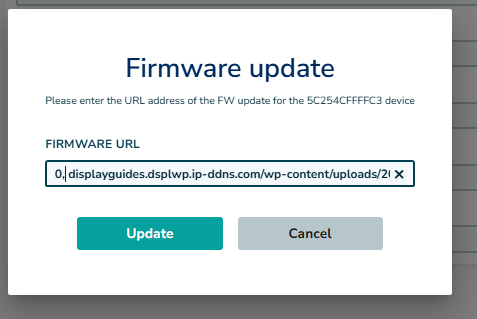
,thus pls copy and use the following text:
0,displayguides.dsplwp.ip-ddns.com/wp-content/uploads/2025/01/FwApp_ATOM-v01.07.01-AU09cB2.bin
other links:
1. ATOM AU09c:
0,displayguides.dsplwp.ip-ddns.com/wp-content/uploads/2025/01/OTAFW_ATOMv171_AU09c.bin2. ATOM :
0,displayguides.dsplwp.ip-ddns.com/wp-content/uploads/2025/01/OTAFW_ATOMv172.bin
OTAFW_ATOMv172Download3. iP2A:
0,displayguides.dsplwp.ip-ddns.com/wp-content/uploads/2025/01/OTAFW_iP2A_v172.bin -
Hello world!
Welcome to WordPress. This is your first post. Edit or delete it, then start writing!